Play and remember
Quizzes for the lesson and a word-learning trainer. Make a topic in 10 seconds with AI or take a ready one: English, maths, any subject — no boring cramming.
Games for the lesson
12 games on any topic: kids play instead of cramming. For tutors, teachers and families.
See games ↓Learn words
Cheat sheet, choose, build, type — words stick. For kids and adults: languages, terms, dates.
How it works ↓Words are remembered, not guessed
Any topic — yours or from the catalog — can be learned, not just played. In small blocks, from recognising to recalling. For kids and adults: foreign words, terms, dates, times tables.
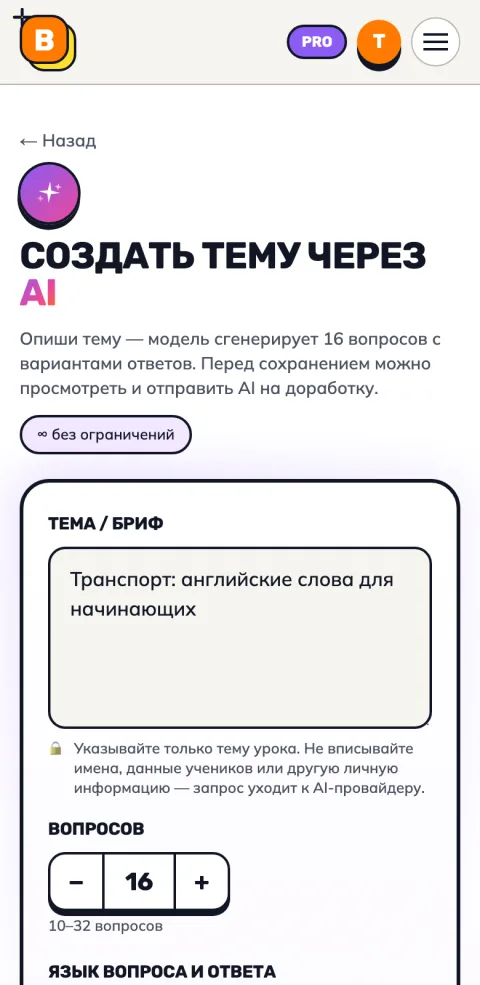 1Create a topicDescribe it — AI writes the questions in 10 seconds. Or add your own, or pick a ready-made one.
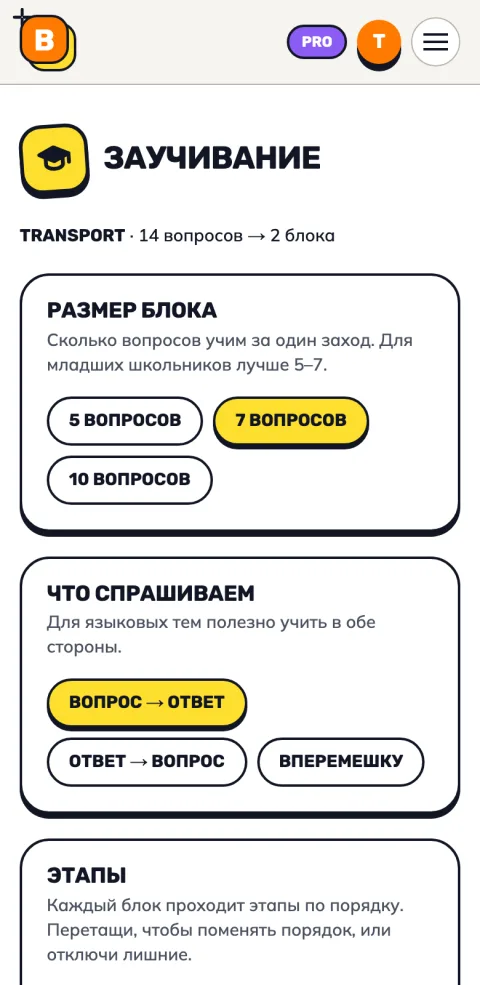 2Set it upBlock size, direction (word → translation or back), stages and their order.
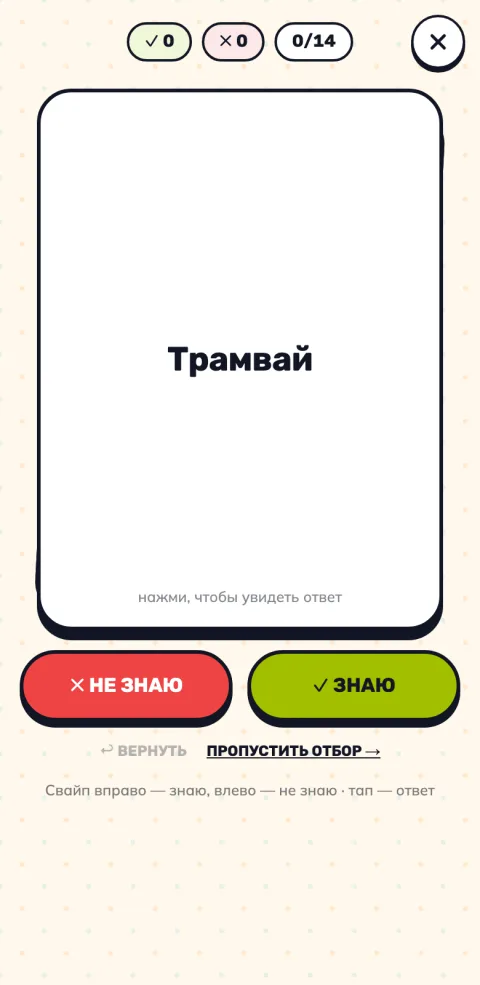 3Pick the wordsFor teens and adults: swipe «know / don't know» — learn only what's new.
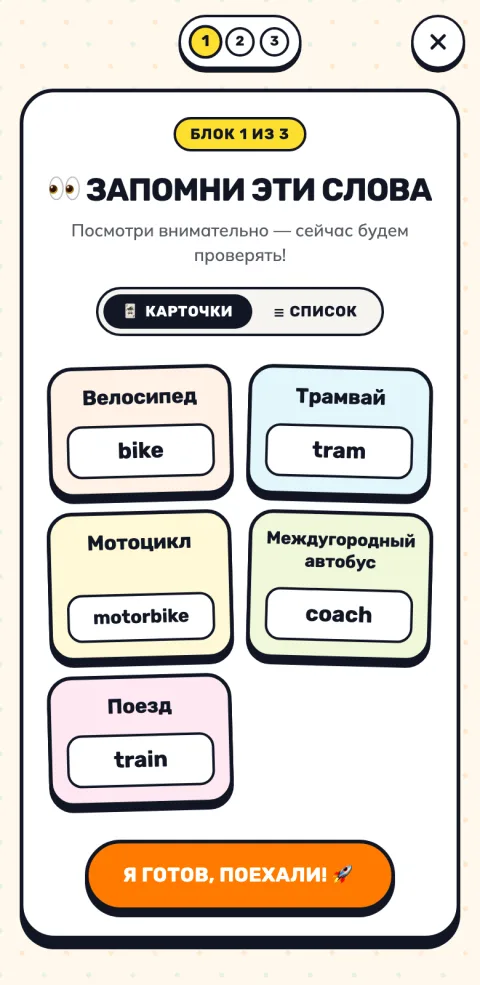 4Cheat sheetFirst look at the block's words with answers — never ask what hasn't been seen.
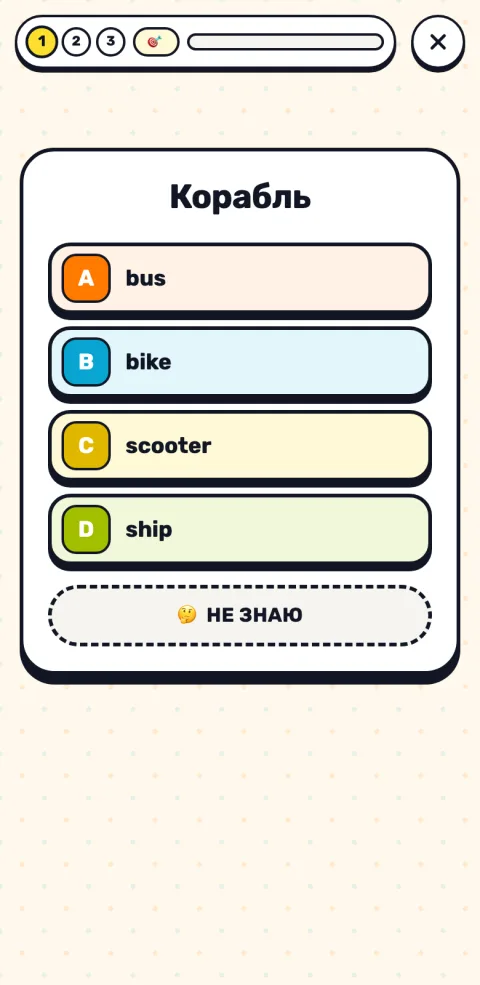 5Choose the answerFour options and an honest «Don't know» button. Two right answers in a row count.
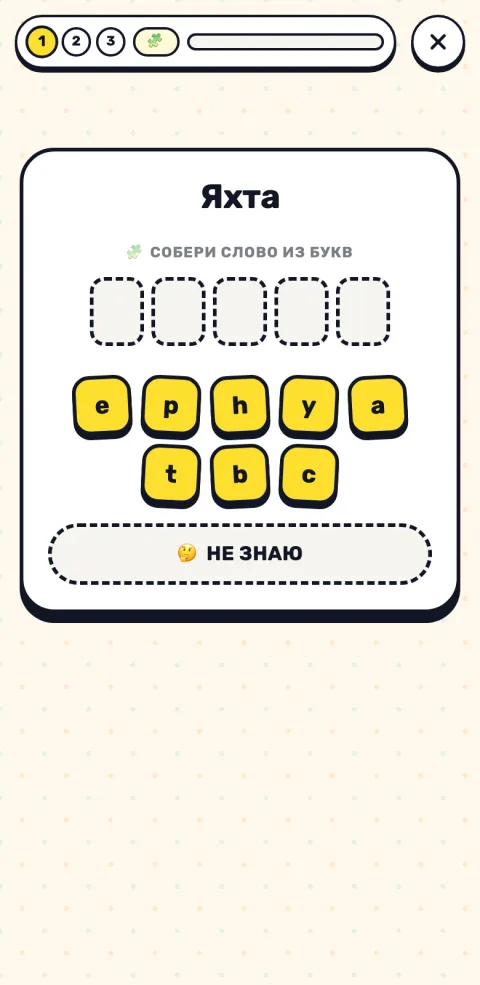 6Build from lettersLetter tiles instead of a keyboard — handy for younger kids and on tablets. For older learners swap it for typing the word.
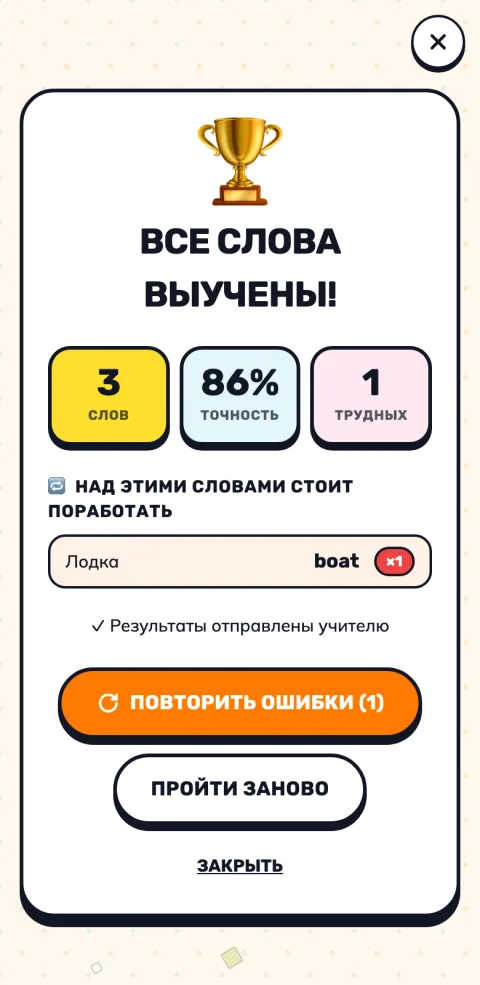 7ResultThe finish: tricky words, «Repeat mistakes» and AI practice. Learned words come back for review in a day, a week and a month.
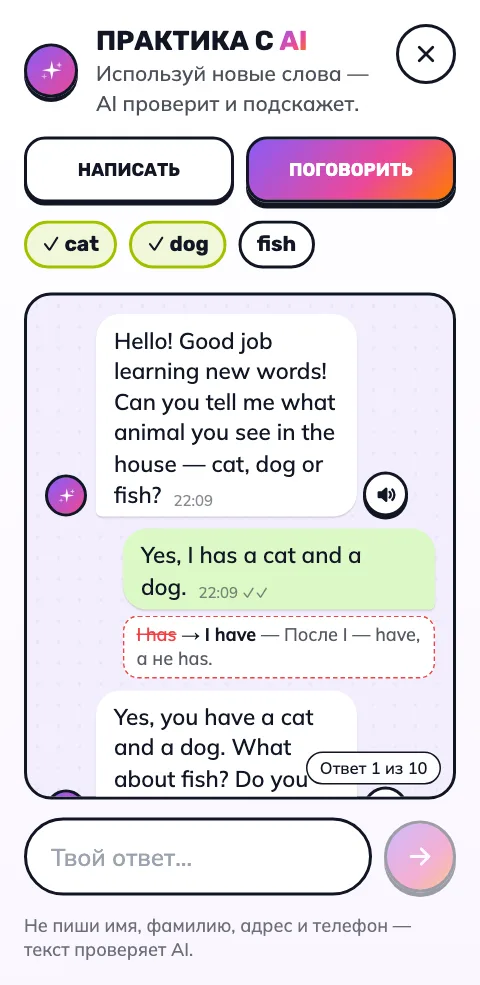
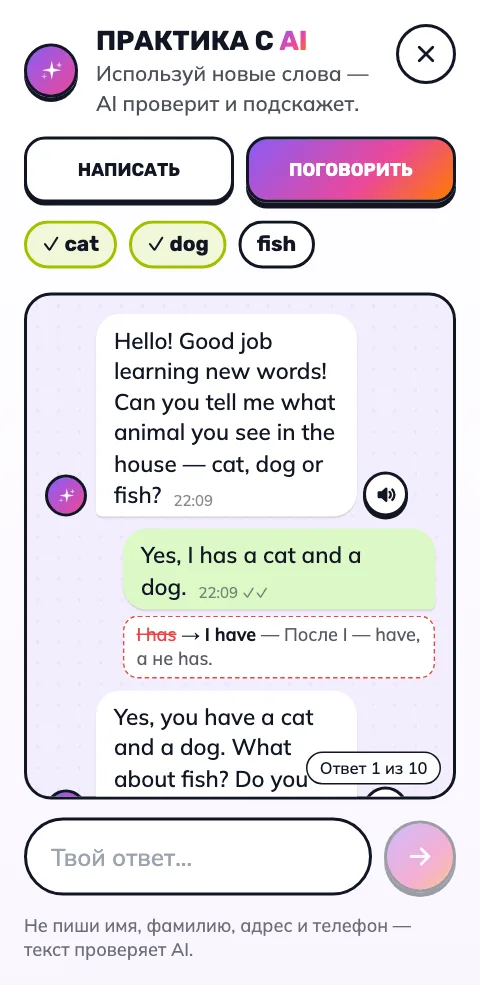 8Practice with AIRight after the topic — 3–5 sentences or a short chat with the new words. AI fixes the mistakes and explains them.
Words don't fade: what you learned comes back for review in a day, a week and a month — spaced repetition. We'll remind you when it's time: one notification a day.
The teacher gets each student's tricky words and, in one click, a link to learn exactly those.
Learn mode is part of Pro — the first 7 days are free.
More about learn mode →Words learned — now put them to use
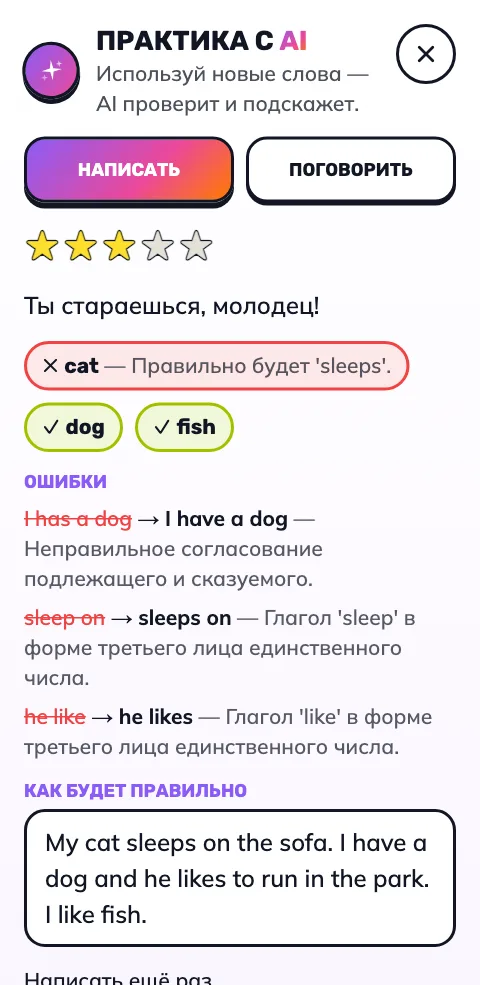
Right after a topic the learner tries the words in real sentences: writes a few lines or chats with AI. AI explains the mistakes, and its messages can be played aloud.
- Write3–5 sentences with the new words. AI scores them, marks which words were used right, fixes the mistakes and shows the correct text.
- TalkA short messenger-style chat of up to 10 messages. AI asks questions on the new words and gently corrects without changing the meaning.
Works for a student by link too, no sign-up. The teacher sees essays and chats on the student card.
The first check is free, then it’s Pro. Contacts are cut out of the text, and it goes to AI without the child’s name.
See what it looks like
How our games for kids work
Three steps from sign-up to playing your first quiz with a class or a child at home.
Build a question bank or grab a ready one
Add your own questions or copy a ready-made English pack — travel words, irregular verbs, idioms, classroom commands, colors, animals, weather, home, professions, phrases, family. Multiple choice or open-ended.
Pick a game for the child
The same question bank plays in many ways — from calm memory training to a fast board-game race or whack-a-mole. Switch format — the child's attention comes back to you.
Play and learn
The host taps ✓ or ✗, the system tracks score, the bear reacts, kids laugh. After the lesson — detailed stats: which words the class missed and which student struggles most.
Build a pack in 10 seconds with AI
Don't want to type questions? Describe the topic — the model will generate 10 to 32 questions with answer options. Preview, iterate, save. Free within the daily limit.
Russian, English, German, French, Spanish, Italian — pick a question/answer language pair for vocabulary packs.
Optionally pull a Pixabay image for each question. Great for vocabulary themes (objects, animals, food).
We show you the draft first. Save as is, re-generate with a hint, or edit manually before saving.
Educational games for kids in one place
One question bank — many different interactive quizzes for kids. Some are team competitions, some calm memory training, some “don't break the bear” or “whack the mole”. Switch formats — the child's attention stays.
What makes our games for kids work in class and at home
Eight reasons teachers and parents pick this service over other kids' quiz tools. Free, no ads, no extra data collection. Built for native-language lessons and familiar teaching formats.
Ready-made quizzes for kids — English packs
Don't want to type questions from scratch? We've prepared educational packs for kids: travel words, irregular verbs, idioms, classroom commands, colors, animals, weather, home, professions, phrases and family. Try them in demo, no sign-up required.
All topics as a list (104)
- Adjectives · 21
- Clothes and accessories · 23
- Colors · 14
- Comparisons — Comparative Adjectives 1 · 15
- Comparisons — Comparative Adjectives 2 · 13
- Comparisons — Comparative Adjectives 3 · 12
- Comparisons — Comparative and Superlative Adjectives 1 · 21
- Comparisons — Comparative and Superlative Adjectives 2 · 21
- Comparisons — Comparative and Superlative Adjectives 3 · 17
- Comparisons — Comparative and Superlative Adjectives 4 · 22
- Comparisons — Comparative and Superlative Adjectives 5 · 21
- Comparisons — Comparative and Superlative Adjectives 6 · 12
- Comparisons — Superlative Adjectives 1 · 16
- Comparisons — Superlative Adjectives 2 · 15
- Comparisons — Superlative Adjectives 3 · 17
- Crime · 16
- Days of the week · 7
- Describing clothes · 11
- Domestic animals · 9
- Environment and verbs · 10
- Environmental problems · 13
- Family — Part 1 · 15
- Family — Part 2 · 10
- Film jobs · 16
- Food and drink · 33
- Free-time activities — Part 1 · 12
- Free-time activities — Part 2 · 13
- Fruits and berries · 15
- Furniture — Part 1 · 16
- Furniture — Part 2 · 19
- Hairstyles · 9
- Jobs — Part 1 · 21
- Jobs — Part 2 · 21
- Landscape adjectives · 11
- Life ambitions · 10
- Life stages — Part 1 · 9
- Life stages — Part 2 · 8
- Months · 12
- Music collocations · 9
- Music styles and instruments · 19
- Nature — Part 1 · 12
- Nature — Part 2 · 17
- Past Continuous. Affirmative · 15
- Past Simple vs Past Continuous · 16
- Past Simple. Affirmative. Irregular Verbs · 15
- Past Simple. Affirmative. Regular Verbs · 15
- Past Simple. Affirmative. Regular and Irregular Verbs · 15
- Past Simple. Multiple Choice · 15
- Past Simple. Negative and Questions · 15
- Past Simple. To Be · 24
- Personality — Part 1 · 12
- Personality — Part 2 · 12
- Pets · 11
- Places in school · 11
- Places in town · 26
- Prepositions of place · 11
- Present Continuous. Affirmative · 15
- Present Continuous. Affirmative · 10
- Present Simple vs Present Continuous. Affirmative · 20
- Present Simple. Affirmative · 10
- Present Simple. Affirmative · 15
- Question words · 9
- Rooms · 16
- School items · 20
- School subjects · 15
- Shops · 10
- Sports equipment · 12
- Sports — Part 1 · 18
- Sports — Part 2 · 19
- Transport · 14
- Types of books · 8
- Types of films · 10
- Types of houses and locations · 16
- Vegetables · 14
- Weather and seasons · 14
- Wild animals · 22
- Математика. Геометрия — 2-4 класс · 20
- Математика. Дроби — 4 класс · 20
- Математика. Задачи на время и единицы измерения — 3-4 класс · 20
- Математика. Сложение и вычитание до 100 — 2 класс · 20
- Математика. Сложение и вычитание до 20 — 1 класс · 20
- Математика. Умножение и деление — 3 класс · 20
- Окружающий мир. Времена года — 1 класс · 20
- Окружающий мир. Животные — 1-2 класс · 20
- Окружающий мир. Правила дорожного движения — 1-2 класс · 20
- Окружающий мир. Природные зоны России — 4 класс · 20
- Окружающий мир. Растения — 2 класс · 20
- Окружающий мир. Страны и столицы — 3-4 класс · 20
- Окружающий мир. Тело человека — 3 класс · 20
- Русский язык. Безударные гласные — 2-3 класс · 20
- Русский язык. Знаки препинания и предложение — 2-3 класс · 20
- Русский язык. Падежи — 3-4 класс · 20
- Русский язык. Словарные слова — 2 класс · 20
- Русский язык. Словарные слова — 3 класс · 20
- Русский язык. Части речи — 2-3 класс · 20
- Таблица умножения и деления — тренажёр · 20
- Таблица умножения на 2 · 20
- Таблица умножения на 3 · 20
- Таблица умножения на 4 · 20
- Таблица умножения на 5 · 20
- Таблица умножения на 6 · 20
- Таблица умножения на 7 · 20
- Таблица умножения на 8 · 20
- Таблица умножения на 9 · 20
Ready to start?
Sign up without email confirmation. In 30 seconds — your first question pack and your first game for kids. Free, no ads.
Create a free account→